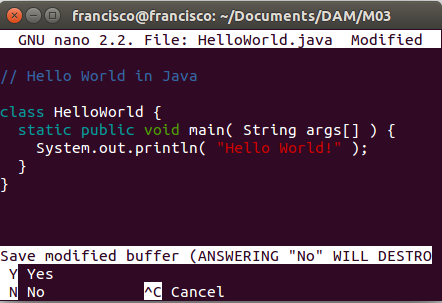
To write this program we will need:
- The Java SE Development Kit 8 (JDK 8)
- A text editor
File creation
A source file contains code, written in the Java programming language, that you and other programmers can understand. Any text editor can be used to create and edit source files.

Compile the source code file into a .class file
The Java programming language compiler javac takes the source file and translates the text into instructions that the Java Virtual Machine can understand. The instructions that appear in these .class files are known as bytecode.
Run the program
The Java application launcher tool java uses the Java Virtual Machine to run your application.

Comments
Comments are ignored by the compiler, but are useful for other programmers.
The Java programming language supports three types of comments:
- / text / The compiler ignores everything from / to /
- / documentation / This indicates a documentation comment (doc comment, for short). The compiler ignores this type of comment, just as it disregards comments that use / and /. The javadoc tool uses doc comments when preparing automatically generated documentation.
- // text The compiler ignores everything from // to the end of the line
Codestatic public void main(String args[]){}`
The public and static modifiers can be written in any order, but the convention is to use public static*. You can assign any argument name you want, but most programmers choose "args" or "argv".
Static means that the class does not need to be instantiated (doing a new) in order to use them. For this reason they are also called class methods (there are also static or class variables).
Members
When a method or a member variable is declared as public, this means that all classes, regardless of the package to which they belong, can access the member.
Members marked as private cannot be accessed by code from another class, except by the class in which they were declared.
Members marked as protected can be accessed from the class in which they were declared or a child class of it.