What are the basic components?
- Activity: Represents a screen with a user interface.
- Example: in a mail App, the screen for composing an email
Service: Runs in the background to perform long-running operations or to perform work originating from different processes.
- Example: listening to music without having the App in the foreground
Content Provider: Allows other Apps to query or modify data stored in another App.
- Example: the built-in contacts App in Android allows other Apps to access them, such as WhatsApp, which can add contacts or query them from there
Broadcast Receiver: Responds to system-wide broadcast messages. The user can be notified via the system notification bar.
- Example: notifying the App that the device battery is low; or receiving push messages and showing the user a received message in the notification bar
All of them must be declared in the AndroidManifest.xml.
Activity
It is something focused on what the user can do (hence it being an "Activity"). Therefore, it interacts directly with the user. It is the window that fills the entire application, containing the user interface. If we switch windows, we switch Activity.
Can it be divided into smaller Activities contained within an Activity?
No, that's what Fragments are for.
How do you associate a Layout with it?
Right after the call to the parent of the onCreate() method with setContentView(R.layout.mi_layout)
How do you open a new Activity?
With Context.startActivity(Intent miIntent) (We will look at this in depth later)
How is it declared in the AndroidManifest.xml?
With the <activity> tag
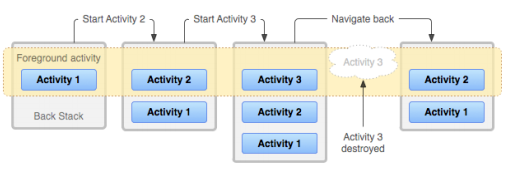
How does an Activity behave when another replaces it?
When an Activity starts, it begins at the top of the Activity stack. The Activity at the top of the stack is the one currently running and displayed to the user. The rest of the Activities remain lower in the stack. The moment the Activity at the top is popped off the stack (ceases to exist; for example, when pressing the "back" button), the one below it will now occupy the top of the stack and therefore be in front of the user.

Activity lifecycle:
An Activity is characterized by having a lifecycle. It is named just like the lifecycle of a living being, as they are similar: it is born, grows, eats, reproduces, and dies.

Suppose we are holding a device with a launched application. Therefore, there will be an Activity on screen, which can follow several paths during its lifetime, such as:
- Starting the Activity: It will go through Create, Start, and Resume to reach normal execution.
- Normal use of the Activity: we are in the Activity itself, running.
- A pop-up window has opened: It will go through Pause.
- Switching to another Activity or locking the phone: It will go through Pause and Stop. (Clarifying note: if switching to another Activity, it necessarily goes through pause and stop; a pop-up window did not need to appear to go through pause—switching Activity goes through both states directly; this occurs with other actions that transition through multiple states).
- Turning off the phone: It will go through Pause, Stop, and Destroy.
The complete lifecycle we have seen in the previous chart translates into the following code (All methods are optional, although using onCreate() is always recommended):
Activity with all of its lifecycle methods
` public class miActividad extends Activity {
@Override
public void onCreate(Bundle savedInstanceState) { super.onCreate(savedInstanceState); //Nuestro código a ejecutar en este momento } @Override public void onStart() { super.onStart(); //Nuestro código a ejecutar en este momento } @Override public void onRestart() { super.onRestart(); //Nuestro código a ejecutar en este momento } @Override public void onResume() { super.onResume(); //Nuestro código a ejecutar en este momento } @Override public void onPause() { super.onPause(); //Nuestro código a ejecutar en este momento } @Override public void onStop() { super.onStop(); //Nuestro código a ejecutar en este momento } @Override public void onDestroy() { super.onDestroy(); //Nuestro código a ejecutar en este momento } }`