What is computer security?

  • A set of techniques and policies that seek to minimize the vulnerability of systems or the information they contain.
  • It is about making the cost of improperly accessing a resource higher than its value.
  • Security is a process, not a product.
  • Total security does not exist.

Types of security

We can talk about two complementary types of security:

  • Physical security: refers to protecting system components (hardware) against physical threats: fires, floods, human access control, power outages…
  • Logical security: refers to data protection. The main techniques applied are access control and cryptography.

Overall security management in an organization must address both types.

When talking about computer security, people tend to think of firewalls, antivirus, detectors, and other tools widely used in the security world, while paid less attention to concepts related to physical security. Making the right decisions regarding physical security characteristics establishes a solid foundation upon which to build other security elements.

Security objectives

Considering the main components of a system (hardware, software, and data), security has the following main objectives:

  • Confidentiality: System components will only be accessible to authorized users.
  • Integrity: System components can only be created and modified by authorized users.
  • Availability: System components must be accessible to authorized users.
  • Non-repudiation: refers to communication between a sender and a receiver. In this communication, the recipient of a message obtains valid proof before a third party regarding the origin of the received data.

Threats

Threats mainly affect hardware, software, and data. These are the three weakest points of any system. Threats cause phenomena such as:

  • Interruption: A point in the system stops working, for example, hardware destruction, operating system failure...
  • Interception: Access to information by unauthorized users, for example, network eavesdropping with sniffers.
  • Modification: Unauthorized access that alters the environment for personal gain, for example, modifying database records, modifying TCP packets sent over the network...
  • Generation: Creation of new objects within the system, for example, creating new records in a database.

Triangle of weaknesses

Other threat classifications

Physical threats → Physical security

  • Ambient temperature.
  • Power outages.
  • Theft and natural disasters.

Logical threats → Logical security (data)

  • Unauthorized access to data (privacy).
  • Unauthorized reading during transmission (confidentiality).
  • Data modification during transmission by an unauthorized third party (integrity).
  • Identity spoofing of a user.
  • Denial of service (availability).

Another classification is based on the attack procedure:

  • Internal threats: caused by internal agents within the organization, such as employees themselves, consciously or unconsciously.
  • External threats: caused by external agents outside the organization who a priori do not have internal knowledge of the system, such as a malicious hacker. In principle, internal threats are more dangerous than external ones due to the knowledge and level of access that employees have to the system.

Securing an IT system is a very complex process that can never be perfect and must be carefully analyzed based on the organization's needs and the resources that can be dedicated to this goal. The general steps to follow are:

  • Risk and threat analysis.
  • Definition of a security plan to minimize threats.
  • Deploying security and monitoring the system.

Security = Process.

Classification by type of attack

An IT system is exposed to multiple threats and attacks. Below is a classification of threats by type of attacker:

  • Hacker: computer expert with great capacity for discovering system vulnerabilities, but without financial motivation.
  • Cracker: a hacker who, when breaking system security, does so with the intention of damaging the system, gaining recognition for it, or obtaining financial gain.
  • Lammer or Script-Kiddies: attempt to hack without advanced computer knowledge. Usually, they only search for and download hacking tools to run them.
  • Sniffers: network experts who analyze traffic to obtain information. They extract information from packets transmitted over the network.
  • Virus programmers: programming, networking, and systems experts who create programs to damage systems.

Access control

Access control is a mechanism to guarantee information security.

It serves to specify who or what can access each of the system's resources, as well as the type of access allowed in each case.

There are two main functions or processes to guarantee access control:

  • Authentication: verification of the identity of a user or another entity in the system.
  • Authorization: granting a right or permission to an entity in the system to access a system resource.

Terminology

An object is a resource with controlled access, for example, records, memory pages, files, directories, and programs.

A subject is an entity capable of accessing objects; generally, the concept of a subject is linked to a process. When a user or application accesses an object again, it actually does so through a process representing the user. Even so, it is common to speak of users as subjects.

GNU/Linux systems

In GNU/Linux systems, there are three classes of subjects:

  • Owner.
  • Group.
  • Others.

An access right indicates how a subject can access an object, such as write, read, and execution.

Matrices and ACLs

Matrices are an implementation of access control.

In practice, the access control matrix is broken down into simpler, more manageable structures called ACLs (Access Control Lists). Therefore, the matrix is split into columns, associating each object with a list of who can interact with it and how.

Authentication

For a user to access a system resource, they must first:

  • Prove who they claim to be (identification).
  • Possess the necessary credentials.
  • Have been granted rights or privileges (both in terms of access and carrying out requested actions).

Identification is a way to ensure that a subject (user or process) is the entity it claims to be.

Determining identity in computer security has three key aspects:

  • Uniqueness: in a system, each individual must have a unique identifier.
  • Non-descriptive: no part of the credential should indicate the purpose of the account. For example, a user identifier should not be webadmin, superuser, or manager.
  • Issuance: elements provided by another recognized authority to prove a subject's identity. A national identity document is a type of security element considered a form of identification issuance.

Once the subject has identified themselves, they must be authenticated; that is, they must prove they are who they say they are. Three factors are used for authentication:

  • Something a person knows (knowledge-based authentication).
  • Something a person has (possession-based authentication).
  • Something a person is or does (characteristic-based authentication).

Multifactor authentication uses two or three authentication factors, ensuring a higher level of security. Generally, the most widely used type of multifactor authentication is two-factor authentication.

An example:

  • A user wants to access a system and must provide something they know (password) and use something they have (magnetic card).
  • Another possibility could be a password and a physical attribute (retina scan).

Authorization

The authentication mechanism makes it possible to verify the identity of a user accessing the system or a specific resource. Once inside, the user will only be able to perform certain actions or access resources for which permission has been granted.

To help system administrators authorize resource access, different criteria can be established through the use of:

  • Roles.
  • Groups.

Password policies

Passwords are the most widespread method to prevent unauthorized access.

  • It is a very economical tool that, when used properly, can be very effective.
  • The misuse of passwords is on the list of the top ten most common security threats.
  • A password policy is a document regulating the rules for password creation, password protection, and the frequency of password renewal.

Weak passwords:

  • Fewer than 10 characters.
  • Words found in dictionaries.
  • Using personal information: family names, dates, postal codes…
  • Using numerical or alphanumeric patterns: qwerty, abcd, 1234....

Strong passwords:

  • Contain both uppercase and lowercase letters.
  • Use alphanumeric values (text and numbers).
  • More than 10 characters.
  • Do not use dictionary words or personal information.

The problem with robust passwords is that they are usually hard to remember, ending up written on a piece of paper under the keyboard.

Biometric systems

Biometric systems verify a user's identity by analyzing some of their physical or behavioral attributes.

  • Based on a physical attribute: base their decision criteria on something the user is, for example, a fingerprint reader.
  • Based on behavior: base their decision criteria on something the user does, for example, a tablet on which the user writes their signature.

Characteristics:

  • Very expensive authentication systems.
  • Used in security systems with high requirements.

There are two types of errors biometric systems can make:

  • A false positive: occurs when the system accepts an impostor who should have been denied.
  • A false negative: occurs when the system denies access to a user who should have been accepted.

Security policies

Logical security

  • Logical security is complementary to passive security elements.
  • Access control to computer equipment requires verifying a person's identity to allow them access to a specific place, data, and/or programs. These measures are also part of the security chain.
  • There are logical structures invented to specify the rights a person accessing the system will have.
  • Examples include access control matrices and access control lists. Prior to applying specific permissions, however, the person must be authenticated, and the most common way to do so is using passwords.
  • Passwords can be very effective if used correctly. If we correctly apply a password policy, much is gained.
  • There are more robust methods to protect access from potential intruders. One of the most robust methods available is the use of biometric systems.

Access control

Access control is one of the most widely used measures to guarantee information security.

It is a mechanism used to specify who or what (for example, a program) can access each specific system resource, as well as the type of access permitted in each case.

Access control in a system fits into a larger context involving the following functions:

  • Authentication: verification of the identity of a user or another system entity.
  • Authorization: granting a right or permission to a system entity to access a system resource.
  1. The user must authenticate to enter the system.
  1. The authentication function determines whether the user can pass or remains outside.
  1. The access control function determines whether the user can access the requested system resource.
  1. To do this, it will consult the authorizations database maintained by a system administrator, which specifies what type of access each user has for a specific resource.
  • Basic access control systems normally define three classes of subjects, with different access rights for each class:
  • Owner: this could be the creator of a resource, such as a file or directory.
  • Group: in addition to the privileges assigned to an owner, a specific group of users may also have access privileges to certain resources. A user can belong to several groups.
  • Others: a smaller set of access rights is granted to users who have entered the system but do not fall into the owner or group category for a given resource.

Access rights may include the following actions:

  • Read: a user can view the information of a given resource (file, directory, record). Read access allows copying or printing resources.
  • Write: a user can add, modify, or delete data from a given resource.
  • Execute: a user can run specific programs.
  • Delete: a user can remove certain resources like files or records.
  • Create: a user can create new files, records, or directories.

Discretionary access control

Discretionary Access Control (DAC) is an access control policy based on the requester's identity and access rules (authorizations) that indicate what requesters can or cannot do.

The term discretionary refers to the fact that a subject can hold access rights for a specific resource.

An implementation of discretionary access control is the data control matrix.

Subjects

Objects

/home/francisco

/home/ruth

/home/albert

francisco

Read, write, cd

ruth

Read, write, cd

albert

Read, write, cd

Read, write, cd

Read, write, cd

In practice, the access control matrix is broken down into simpler, more manageable structures to implement in an operating system or database.

There are two main options:

  • Decompose the matrix into columns and associate each object with a list of who can interact with it and how. This list is called an Access Control List (ACL).
  • Decompose the matrix into rows and associate each subject with a list of what it can do. The elements of this list are called capabilities.

Resource access control

To guarantee the security of an IT system, users must correctly identify and authenticate themselves to gain access.

Once inside, users can only access resources for which they have been given permission—that is, those they are authorized to use. Therefore, users will only be able to perform tasks for which rights have been granted.

Permissions:

  • The system administrator can access and configure the environment so that certain users cannot view, modify, or delete specific files or directories.
  • It is also possible to grant certain permissions to groups of users with similar characteristics.
  • There are several mechanisms to control who is authorized to use a resource and who is not. Generally, operating systems store the users and groups that can use each resource and under what conditions (read, write, execute…).
  • One mechanism for controlling access consists of using Access Control Lists (ACLs).

Permissions in Linux environments

In a folder, we can use the ls -l command to see the permissions of files and directories, which displays the contents of the directory in a LINUX system, including the permissions of each file or subdirectory.

The first character indicates the object type: regular file (-), directory (d)...

Next, we find 9 characters representing access permissions for the file or directory, indicated in groups of three:

  • User owning the file or directory (user).
  • User group of the file or directory (group).
  • Other users (others).

Each group of three characters has read as the first, write as the second, and execution as the third, which are the basic permissions.

After permissions, there is an integer representing the number of hard links to the file or directory.

Next, we can find the owner user and group of the file or directory.

To modify permissions in UNIX systems, the chmod (change mode) command is used.

It allows specifying which permissions to add to or remove from a specific file or directory. There are several ways to use the chmod command. For full help, you can check the man page with man chmod

chmod [ugo][+/-][rwx] file

  • u: owner
  • g: group
  • o: others
  • +: grants permissions.
  • - : removes permissions.
  • r: read
  • w: write
  • x: execution.

chown user file:

  • Changes the owner of a file or directory.

chgrp group file:

  • Changes the group of a file or directory.

Access Control Lists

Access Control Lists (ACLs) improve the security of files in our system.

In these lists, the privileges a user has individually over a specific file are defined; that is, they allow or restrict access to files individually without considering the group to which the user belongs.

ACLs allow granting additional access privileges. The owner of a file can, thanks to ACLs, grant privileges to one or more users that will override base access privileges.

With ACLs, it is possible to grant privileges to a user who is not part of the group without modifying the privileges of others. Likewise, access privileges can be granted to a group of users that does not belong to the file's group.

ACLs are a kind of table telling the OS who does or does not have permission to access a specific object and are exclusive to NTFS-formatted partitions. All these permissions can be modified using the cacls command.

Security descriptors

Any object in a Windows OS with an NT kernel on an NTFS file system has security parameters associated with it, stored in what are called security descriptors.

A security descriptor stores who owns the object and which user group it belongs to, as well as who has access to the object and what types of permissions they hold. These permissions are saved in ACLs.

Security descriptors are not stored in any specific folder; instead, they exist as metadata within the MFT. Therefore, we cannot directly access or edit these descriptors. The furthest we can go is viewing them encrypted in the Windows registry.

For example: we log in with an administrator account, and go to Start → Run → regedit. If we navigate to the registry key shown in the image, we will see the Security value. This is the security descriptor associated with the "Event Log" service.

Through the cacls command, we can modify them.

ACLs: The CACLS command

The cacls command is responsible for managing the aforementioned ACLs. An ACL contains an ACE (Access Control Entry) that indicates what permissions each user has. That is, one ACE for each user or group.

To view it, we must access the Security tab that appears when right-clicking on a folder or file and selecting Properties. In Windows XP (Tools|Folder Options|View).

ACLs in Windows

  • Syntax: cacls file /parameters
  • Parameters:
  • File: displays ACLs.
  • /t: Changes ACLs of specified files in the current directory and all subdirectories.
  • /e: Modifies the ACL instead of replacing it.
  • /c: Forces modification even if errors are encountered.
  • /g: user:permissions; R(read); W(write), C(change), and F(full control). Grants access rights to the user.
  • /R user: Revokes user rights.
  • /p user:perm: Replaces rights of the specified user (or removes all with :n).
  • /d: denies access to the specified user.

cacls is deprecated and icacls is used instead.

ACLs in Linux

  • First, we check whether the LINUX distribution supports ACLs with the command # grep POSIX_ACL /boot/config-’uname -r’.
  • Install ACL if it is not present: apt-get install acl.
  • The file partition must support ACLs, configured via the /etc/fstab file. The fstab file: used to check the partition and configure the access control list.
  • getfacl: displays information about the file's access control list.
  • setfacl: grants permissions to a user over a file.

System access security mechanisms

Authentication methods are the mechanisms a machine uses to verify that the user trying to access is who they claim to be.

These methods can be classified into 3 groups based on the means used to identify oneself:

  • Something the user knows and others do not (password, PIN, etc.).
  • Something the user has (bank card, key card, ATM card…).
  • A characteristic unique to the user, physical or behavioral characteristics (fingerprints, iris, typing dynamics, etc.). This type is known as biometric mechanisms.

For example, in security policies with Windows XP, user security policies can be configured regarding passwords and account lockouts. Policies can be configured from Local Security Policy.

Password policies

On most computer systems, user authentication is performed by entering a username and password. System security is strongly linked to a good choice of password and its confidentiality. For this reason, companies usually define password policies establishing minimum length, format, lifetime, etc.

A password policy is a document regulating the rules for creating passwords, protecting passwords, and the frequency of password renewals.

Characteristics a good password must fulfill

  • They must not consist of words found in dictionaries, neither in Catalan nor in any other language, as any brute-force program will easily discover them.
  • They should not exclusively use uppercase or lowercase letters, as this reduces combinations.
  • They must not consist exclusively of numbers, for the same reason as above.
  • We must not use personal information (family names, date of birth, telephone number, etc…).
  • We must not reverse recognized words. Any program built for this purpose would discover it quickly.
  • We must not repeat the same characters in the same password.
  • We must not write the password down anywhere, neither on paper nor in unencrypted electronic documents.
  • We must not send it in any email requesting the password.
  • We must not communicate it to anyone over the phone.
  • We must limit the number of failed attempts. If the maximum allowed attempts are exceeded, the user account must be locked and should contact the security technician.
  • We must change default access passwords provided by manufacturers of routers and other network devices.
  • We must not use the same password across different machines or systems, because if discovered, all other systems we access would become vulnerable.
  • We must not allow applications to remember passwords.

Therefore, passwords must be:

  • Character strings containing uppercase and lowercase letters, numbers, and special characters without any apparent logic.
  • Password length should be greater than 8 characters, although over 15 is highly recommended.

A technique to generate robust passwords is to create them from a song or sentence that is easy for us to remember. For example, using the phrase "Esto es una manera de recordar una contraseña", we can generate the password from the initials of each word and change the word 'un' to 1, adding an alphanumeric character: Ae1MdR1c!

If we comply with all recommendations, any intruder attempting to discover the access key using brute-force programs like John the Ripper or similar will waste a lot of time and give up.

Remember that a poorly chosen or inadequately protected password can represent a major security hole in system security.

There are many programs that generate secure passwords for us if we lack imagination.

Time table to crack passwords:

Subjects

Objects

/home/francisco

/home/ruth

/home/albert

francisco

Read, write, cd

ruth

Read, write, cd

albert

Read, write, cd

Read, write, cd

Read, write, cd

Passwords, besides being robust, must be well protected, because if they fall into the hands of potential attackers, they can bypass the entire system's security.

There are many methods attackers use to figure out a password.

A widespread method is social engineering, where, for example, an attacker calls a user claiming to be the system administrator and asks for their password. Since the user works at a multinational company and does not know the system administrator in person, they hand over the password thinking it really is the administrator.

Basic rules for password protection

  • Never write a password in an email.
  • Do not say your password over the phone to anyone.
  • Do not share your password with coworkers, even direct superiors.
  • Do not discuss passwords in front of other people.
  • Do not leave password hints to make it easier to remember and simultaneously easier to guess.
  • Never write your password in forms, even forms from the security department.
  • Do not share your password with friends or family.
  • Do not tell anyone your password when going on vacation.
  • Do not write your password on paper in case you forget it.
  • Change your password at least every six months.

Biometric systems

Biometric systems verify a user's identity by analyzing physical or behavioral attributes.

Modern biometrics is constantly designing biometric access systems for physical spaces and digital information. It is applied to facial patterns, retina, facial thermogram, hand geometry, voice, and others.

The most sophisticated ones verify whether identification is performed using a live organ.

An example of a physical attribute-based biometric system is a fingerprint reader. These systems base their decision criteria on something the user is.

On the other hand, an electronic tablet where a user writes their signature is a behavioral biometric system. These systems base their decision criteria on something the user does.

Biometric systems relying on behavioral patterns face the issue that these patterns can change over time or be forged by attackers.

Biometric systems function by scanning a physical or behavioral pattern of the user and comparing it to a registered sample model. If both samples match, authentication succeeds. Users must be enrolled in biometric systems. During this process, the system collects a sample of the user's pattern to serve as a reference for future authentication attempts.

Biometric systems, like any system, are not infallible and may produce errors during authentication.

There are two types of errors in biometric systems:

  • A false positive occurs when the system accepts an impostor who should have been denied.
  • A false negative occurs when the system denies access to a user who should have been accepted.

No. of characters

Uppercase, lowercase, and special characters

Lowercase only

3

Less than a second

0.02 seconds

4

Less than two minutes

0.046 seconds

5

Approximately two hours

10 seconds

6

Approximately 9 days

5 minutes

7

Between 2 and 3 years

Approx. 2 hours

8

Approximately 2 centuries

Less than 3 days

9

About 20,000 years

Approx. 2 months

Iris scanner

An iris scanner is placed near access control points. It can be mounted on a wall or a stand. During data capture, the software processes the image by applying algorithms that extract parameters, which are subsequently encoded and stored in a database to serve as a recognition measure, opening or denying access to areas designated for that person.

Iris recognition is considered a high-reliability system, meaning it is difficult to forge.

Palm scanner

One of the most reliable hand identification systems consists of capturing the vein pattern passing through the palm.

A digital image of the pattern is created and preserved in a database, serving for subsequent identification and access permission of the registered person.

Fujitsu created the PalmSecure identification system for palms.

Once recognition samples are taken and archived, access control takes place by placing the hand a few centimeters above the scanner reader. This identification system is considered highly reliable.

Facial recognition scanner

Facial recognition relies on mapping points on the face and measuring distances between them, such as the distance between a subject's pupils.

Until recently, 2D technology was used, but 3D technology has recently been adopted, bringing a third parameter to identification: depth.

After completing the registration phase, the system operates as follows:

The person stands in front of a video camera capturing their image; camera software recognizes key facial points and calculates distances. Finally, obtained values are compared against the database to identify the person and admit or deny entry or exit.

System reliability is moderately low for two main reasons:

  • A person can disguise their face using prosthetics or similar means.
  • Facial features change over the years, wrinkles appear, etc.
  • The lighting factor, as light sources cast shadows on the face that can confuse the system.

Biometric process

  • Enrollment: using sensors, it reads and extracts identifying user features, saving the template to a database.
  • Identification: reads and extracts features to recognize the user. This pattern is compared to stored templates in the database, returning an identity decision.

Common biometric systems

Anatomical verifications:

  • Hand: fingerprints, geometry, veins…
  • Face: Geometry.
  • Ocular patterns: retina, iris...

Behavioral verification:

  • Voice pitch/timbre.
  • Handwriting: keyboard dynamics, handwritten text, user signature.
  • Gait length and cadence.

User authentication

Once a subject identifies themselves, they must be authenticated—that is, prove they are who they claim to be.

Three factors are used for authentication:

  • Something a person knows (knowledge-based authentication).
  • Something a person has (possession-based authentication).
  • Something a person is or does (characteristic-based authentication).

Explanations:

  • Knowledge-based authentication, such as a password or safe combination, is usually the most cost-effective to implement. The main drawback is that unauthorized individuals can discover the secret information and access the system regardless.
  • Possession-based authentication, such as a key or access card, is commonly used to access facilities, but can also authenticate systems. The problem arises when someone loses their property or has it stolen, potentially leading to unauthorized access.
  • Characteristic-based authentication relies on a person's physical attributes. Static biometric systems use unique physical attributes like fingerprints or retinas to authenticate users (something the user is). Dynamic biometric systems recognize users by voice or writing characteristics (something the user does).
  • Multifactor authentication uses two or three authentication factors, ensuring higher security. Generally, the most common type of multifactor authentication is two-factor authentication:
  • Example: a user wants to access a system, so they must provide something they know (password) and use something they have (magnetic card).
  • Another possibility could be a password plus a physical attribute (retina scan).

Authorization

The authentication mechanism allows verifying a user's identity when accessing the system or a specific resource. Once inside, the user can only perform certain actions or access resources they have been granted permission to use.

The system administrator authorizes users to perform specific tasks. Thus, the administrator retains maximum control over the system, restricting access to certain resources and limiting what each user type can do.

  • Suppose user Juan identifies himself correctly and enters the system, accesses a text file, and tries to open the document.
  • Before the screen appears, the system checks whether Juan is authorized to access the requested file. If authorized, he can view the file content; otherwise, an error message appears stating he lacks access.

Access criteria

To assist system administrators in authorizing resource access, different access criteria can be established through roles, groups, locations, access hours, and transaction types.

Roles are used when granting permissions to a user type performing a specific task. This role is based on a job type or function.

For example, an auditor working at a company will need read access to any transaction performed. This role will not require privileges to modify or delete data.

Groups work well when several users share similar characteristics requiring access to certain resources and data. Grouping these users and assigning corresponding group permissions is simpler and more effective than doing so person by person.

In a school, two groups can be created: students and teachers. Subject directories and files will be readable by both groups, whereas only the teachers group will hold privileges to modify or delete data.

User location when attempting resource access is another effective way to control system access. Location can be:

  • Physical: a resource can only be accessed if physically present at the site.
  • Logical: usually considering the IP address of the computer accessing the system.

An example of logical location is as follows:

Configure a database server such that queries can only be made from company computer IP addresses.

Access hours are another security mechanism to control system access. This criterion allows establishing time windows during which a specific resource can be accessed.

Suppose we have a web server for administrative tasks using forms. Access hours can be configured from 8:00 AM to 8:00 PM for form submission. Outside this window, no data entry will be allowed.

Finally, transaction type restrictions allow controlling data accessed during certain function types and actions that can be performed on the data.

When accessing our bank account online, we can view the remaining balance but cannot make transfers unless we pass another security level.

Backups

Goals of backups

Backups guarantee 2 objectives:

  • Integrity.
  • Availability.

They are useful for restoring the operating system, applications, and data if a disaster occurs.

Backups can be made on many storage media: tapes, CDs, DVDs, external disks, or remote storage devices. We must consider how to securely destroy media containing stored data.

Various market methods guarantee data destruction.

Activities:

Visit the following pages and analyze the different disk and computer destruction mechanisms they offer.

http://www.blancco.com/es/frontpage/

http://www.edrsolutions.com

Performing backups

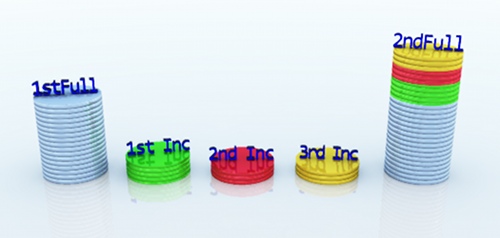
We can differentiate 3 classes of backups, depending on the volume of files to store:

  • Full: backs up all selected files and directories.
  • Differential: backs up all files created or updated since the last full backup.
  • For example, if we perform a full backup every Friday at 00:00.
  • And a differential backup on remaining days.
  • Each differential backup saves files created or modified from Friday at 00:00 up to the moment of the new backup.
  • Advantages:
  • Requires less storage space and processing time for the backup.

Incremental: Backs up files modified since the last full or differential backup.

  • For example, if we make a full backup on Friday at 00:00 and incremental backups on remaining days at the same time, each incremental backup will only store files created or modified on that specific day.
  • Advantages:
  • The backup process is faster.
  • Takes up less space, but restoring files after disaster loss requires the full backup plus all incremental backups taken since the full backup.

Backup scheduling

A rotation scheme is an optimal method for securing information across multiple media or containers.

There are three types of rotation schemes:

  • GFS (Grandfather-Father-Son).
  • Tower of Hanoi.
  • Incremental backup.

GFS (Grandfather-Father-Son)

It is the most popular rotation scheme, consisting of:

  • A monthly full backup (preferably off-site), which is the grandfather (Grandfather).
  • A weekly full backup (on-site), the father (Father).
  • A daily incremental backup, the son (Son), also on-site.

Benefit: maintains recent copies of information while simultaneously keeping older backups for a defined period.

Example:

Fingerprint reader

Retina scanner

Fingerprints are formed by the ridges found on human fingers.

A unique feature of each person.

Reads the pattern formed by blood vessels located in the ocular retina. Uses a camera that projects a beam of light into the eye to capture the pattern.

If the system fails on Thursday(12):

  • The full backup from Friday(6) is required.
  • If differential backups are used: Only the differential backup from Wednesday(11).
  • If incremental backups are used: All incremental backups from Saturday 7 through Wednesday 11 are required.

Tower of Hanoi

Consists of a full backup (assuming 5 disks, labeled A through E).

  • Disk A is reused daily.
  • Disk B every 4 days.
  • Disk C every 8 days, and so on, covering the month.

Example:

5 disks (A-E) → 16 days.

2^(n-1), where n is the number of disks.

Sunday(1)

Monday(2)

Tuesday(3)

Wednesday(4)

Thursday(5)

Friday(6)

Saturday(7)

Differential/ Incremental or NONE

Differential/ Incremental

Differential/ Incremental

Differential/ Incremental

Differential/ Incremental

Full

Differential/ Incremental or NONE

Sunday(8)

Monday(9)

Tuesday(10)

Wednesday(11)

Thursday(12)

Friday(13)

Saturday(14)

Differential/ Incremental or NONE

Differential/ Incremental

Differential/ Incremental

Differential/ Incremental

Differential/ Incremental

Full

Differential/ Incremental or NONE

Benefit:

Performing the backup as well as the restore is much simpler, and even cheaper than GFS.

Disadvantages:

Requires high-capacity storage media and, in automated environments, specialized software for this methodology.

Incremental backup

Files modified since the last full or differential backup are copied.
Removable and remote storage media

One of the most common mistakes is using the same media where original data resides to store backups, or placing backups in the same physical site as the backed-up equipment.

The purpose of a backup is to recover data in case of disaster. If the backup resides on the same disk or partition and a physical breakdown occurs, we cannot recover either the original data or the backup.

Backups can be stored on various media: external hard drives, compact discs, DVDs, magnetic tapes, flash memories, SSD drives, etc.

Performing backups in a location separate from the original site is called Off-site Data Protection. Numerous companies specialize in these services, such as http://www.perfectbackup.es.

Rewritable CDs and DVDs:

  • Offer a very limited number of writes.
  • After several dozen writes, recordings fail and messages like "media is read-only" appear.

Magnetic tape:

  • One of the oldest storage media still in use today.
  • Its main characteristics are high storage capacity and high reliability.
  • Slower than conventional hard drives, as data access is sequential.

Flash memories:

  • USB drives, microSD, CompactFlash, and similar.
  • Not recommended, as they break easily due to physical shocks or accidental high voltage, and offer low capacity.

Hard drives (HDD):

  • Use magnetic recording methods.
  • While evolving rapidly, progress has mainly increased capacity, sector access time, and reliability.

Solid State Drives (SSD):

  • Backups are increasingly performed on SSD media.
  • Disadvantage: cost—they are expensive, and capacity is limited.
  • Advantages over conventional hard drives:
  • No mechanical parts, making them reliable compared to traditional hard drives.
  • Higher performance and lower access time (well below a millisecond) compared to dozens of milliseconds typical of traditional hard drives.

Restoring backups

System restore points

Just as we back up data, we must back up the operating system to restore normal functionality as quickly as possible without reinstalling the OS from scratch.

For Microsoft Windows systems, we can attempt to restore the system to its state before issues occurred. Restoration reverts system files to a previous state.

For this reason, system restore points must be created and saved.

To enable it in Windows 7:

  1. Open Control Panel.
  1. Click System.
  1. Select System Protection on the left panel.
  1. Select the drive to activate automatic protection, configure, and choose the desired restore setting.

Booting with Last Known Good Configuration

Occasionally, system restore cannot be performed, either because restore points were not created or because the system is severely degraded.

If Windows fails to start, we can use the Last Known Good Configuration startup option.

In Windows, rebooting the machine and pressing F8 opens an advanced boot options menu.

Select Last Known Good Configuration, and the system should boot normally.

If this option fails, attempt system restoration from the command prompt using rstrui.exe.

If the machine cannot start with previous options, try Windows Startup Repair.

It resolves common problems like missing or corrupted system files. Follow these steps:

  1. Restart the computer.
  1. Press F8 at boot to access Advanced Boot Options.
  1. Select the 1st option: Repair your computer.
  1. Select keyboard layout.
  1. Enter username and password.
  1. In System Recovery Options, select Startup Repair.

Automated System Recovery

If the system is so degraded that it cannot boot even in Safe Mode, and we previously created a backup using ASR (Automated System Recovery) on external media (DVD, hard drive, SD card, etc.), we can recover it.

Steps are as follows:

  1. Boot the computer using the original operating system CD.
  1. At initial setup, press F2 when prompted at the bottom.
  1. Follow requested prompts.
  1. Specify the media and backup file.

Image creation and restoration

To back up the full system (making reinstallation simpler, faster, and easier), applications such as Symantec Ghost and Acronis True Image exist, among others.

Cryptography

Introduction to cryptography

The term cryptography stems from Greek:

krypto = hidden

graphos = writing

It guarantees the confidentiality of transmitted information.

IEC definition of cryptography:

"A technique for converting text or data into a message incomprehensible to anyone without the cipher or key."

Rubicon Labs definition:

"The science studying secret writing—that is, designing secret codes and the inverse operation to interpret encrypted messages."

History of cryptography

Scytale (5th Century BC)

The earliest encrypted messages date back to the 5th century BC, where Spartans in ancient Greece used the scytale to conceal communications.

With this method, the sender wrapped a strip around a rod and wrote the message longitudinally. Afterwards, the strip was unwound and sent to the recipient. If intercepted by enemies, they would only see a meaningless set of characters. The recipient could only interpret the message if possessing an identical rod used to write it (that is, a rod with the exact same diameter).

Polybius (2nd Century BC)

In the mid-2nd century BC, Greeks developed another method named after historian Polybius.
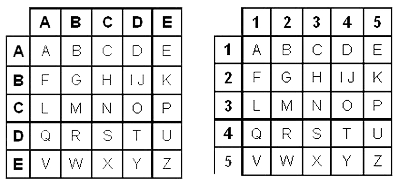
The cipher consists of replacing each letter of the original message with a pair of letters or numbers indicating its row and column.

Caesar Cipher (1st Century BC)

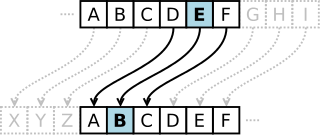
In the 1st century BC, Romans developed the Caesar cipher.

The cipher replaces each character with another by shifting original alphabet characters 3 positions to the left, wrapping around the end of the alphabet when needed.
Vigenère (16th Century)

In the 16th century, Blaise de Vigenère expanded on Leon Battista Alberti's (15th c.) work by using 26 cipher alphabets, each starting with the letter following the previous one:

Thus, the sender could encrypt the 1st letter using the 5th alphabet, the 2nd with the 10th, the 3rd with the 5th, etc...
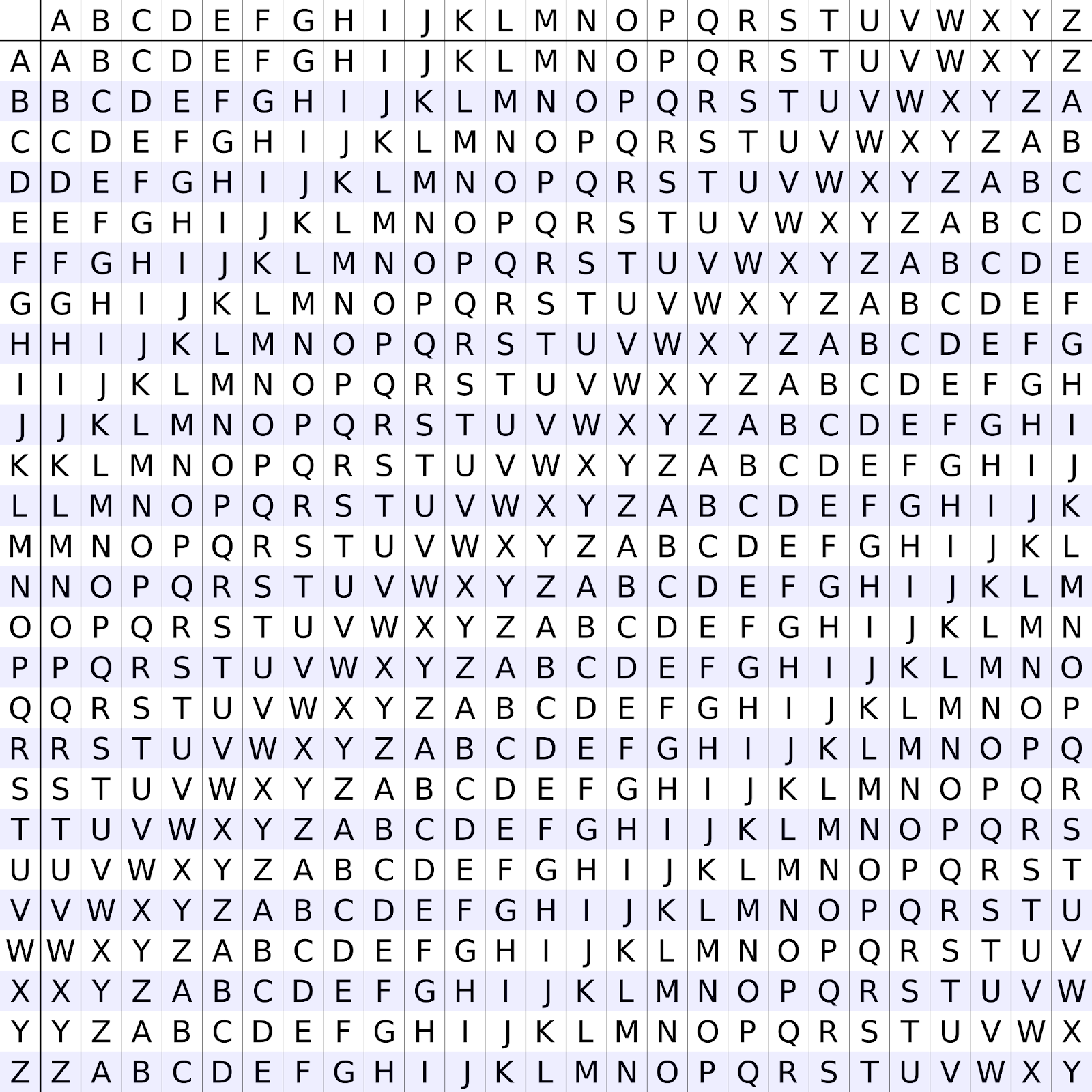
To decrypt the message, the recipient must know which row of the Vigenère square was used for each letter, requiring prior agreement. This is achieved using a keyword, repeated as many times as necessary to match the total length of the plaintext.

The advantage of this method is that frequency analysis cannot crack the hidden message, as a single letter corresponds to multiple combinations.

Another advantage is that countless keys can be used.

Other ciphers

Alberti cipher (one of the first polyalphabetic ciphers).

19th Century Ciphers

  • Wheatstone cipher.
  • Bazeries cipher.

20th Century Cipher Machines

  • Enigma machine.
  • Hagelin machine.

Classification of cryptographic methods

Classification according to cryptographic techniques:

  • Transposition systems: Consists of rearranging the order of letters, syllables, or groups of letters. Depending on the number of transpositions, we can classify them into:
  • Simple transposition systems: plaintext undergoes a single transposition.
  • Double or multiple transposition systems: a second transposition is applied to text already encrypted via simple transposition. This method offers greater security.

Substitution systems: Consists of replacing certain letters of the alphabet with others or sets of characters based on the method. Classified as:

  • Literal: letters are replaced by letters.
  • Numerical: replaced by numbers.
  • Steganographic: replaced by symbols or hidden behind an image, sound, etc.

Symmetric and asymmetric cryptography

Today we mainly use two encryption methods.

  • Symmetric Encryption (or private key), which uses the same key for encryption and decryption.
  • Asymmetric Encryption (or public key), which uses a key pair for the encryption and decryption process.

Symmetric cryptography

Symmetric encryption (or private key) uses the same key for encryption and decryption. This cipher relies on a shared secret between the entity encrypting the message and the one decrypting it.

The Vigenère method is a clear example of symmetric cryptography.

Disadvantages

Key exchange: if individuals know each other and meet physically, exchanging keys is easy; however, if separated by thousands of kilometers or unacquainted, using email, regular mail, phone calls, etc., represents insecure channels where intruders could capture the key.

Number of keys a person must memorize: assuming someone exchanges confidential information with 50 different people, using a distinct key for each and periodically changing them for security—how many keys must they memorize? Countless.

Asymmetric cryptography

Asymmetric encryption (or public key) means each communicating party holds a key pair for encryption and decryption.

A public key (for encryption), shared with any entity they wish to communicate secret messages with, and a private key (for decryption), which must never be shared.

To encrypt a message, the sender uses the recipient's public key; simultaneously, the recipient decrypts it using their private key.

Keys are generated together and are mathematically linked through one-way functions.

It is practically impossible to derive the private key from the public key.

In a public-key cryptosystem, users pick a random key known only to them (private key). From this key, an algorithm automatically derives the public key. Users exchange this public key over an insecure channel.

When a user wants to send a message, they simply encrypt it using the recipient's public key (found on a key server). The recipient decrypts the message using their private key (known only to them). This system relies on a function easy to compute in one direction and mathematically intractable to reverse without the private key.

Algorithms

Algorithms are the methods used to transform plaintext into ciphertext, such as the Caesar substitution cipher.

Today, various algorithms are used, some suited for private key cryptography and others for public key cryptography.

Session

Backup level

1

2

3

4

5

6

7

8

9

10

11

12

13

14

15

16

1 (Incremental)

A

A

A

A

A

A

A

A

2 (Differential)

B

B

B

B

3 (Differential)

C

C

4 (Differential)

D

5 (Full)

E

Hash function

These are functions mapping every document to a number, possessing the property that knowing the numerical value does not reveal the document.

These are known as one-way functions.

Hash functions must satisfy the following requirements:

  • It must be extremely difficult for two different documents to produce the same hash.
  • It must be virtually impossible to reconstruct a document from a hash value.

Generating a document's hash value requires mathematically complex algorithms to meet both specs.

Some of these algorithms include MD5 and SHA.

Hash functions serve to guarantee text integrity.

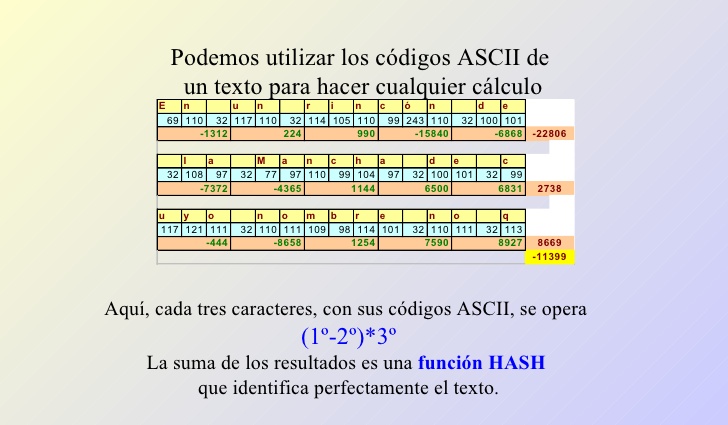
For instance, ASCII code could build a simple hash function:

  1. ASCII assigns a number to every letter or punctuation mark.
  1. It is an international standard symmetric key.
  1. Used by all computers, for example.
  1. We can replace each letter in a text with its ASCII code.
  1. We can perform calculations on ASCII codes of a text.
  1. Here, every three characters are calculated via their ASCII codes.
  1. Formula = (1st-2nd)*3rd
  1. The sum of results yields a HASH function uniquely identifying the text.
Digital signature

A digital signature allows message recipients to verify the authenticity of data origin and confirm that information was not modified after generation.

Digital signatures support data authentication and integrity, as well as non-repudiation of origin, since the sender of a digitally signed message cannot claim they did not send it.

Digital signatures serve the same purpose as handwritten signatures. However, handwritten signatures are easy to forge, whereas digital signatures are impossible to break without discovering the signer's private key.

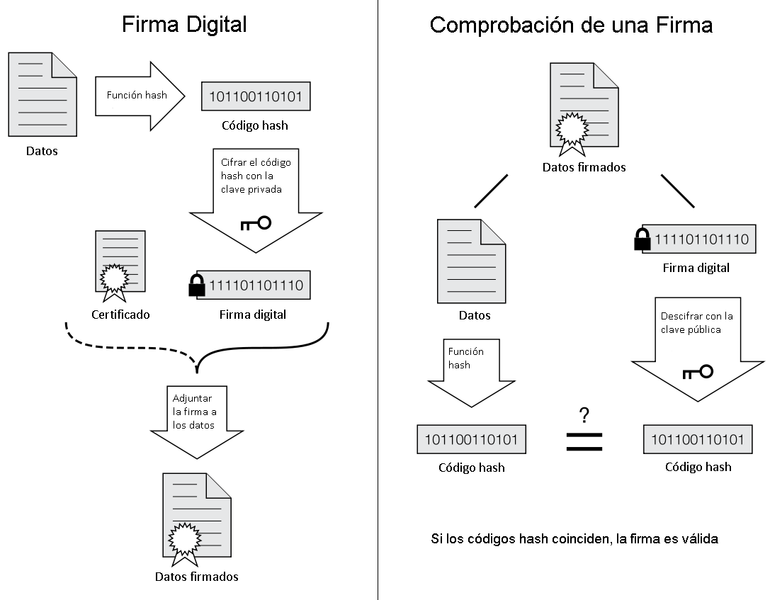
Mechanism description of an electronic signature:

  • A hash value of the document is calculated using an algorithm like SHA.
  • This hash value is encrypted using the private key from our public-private key pair.
  • The resulting value is known as the document's digital signature.

Verification process of a digital signature:

  • The signature is decrypted using the signer's public key, retrieving the summary value of the document.
  • A hash value of the document is calculated independently using the same algorithm (e.g., SHA).
  • Finally, both summary values are compared; if they match, the signature is valid; if they differ, the signature is void.
Digital certificate

A digital certificate is a document containing information about a person or entity—storing name, address, email… along with a public key and a digital signature from a trusted organization (Certificate Authority) confirming that the public key belongs to the certificate owner. This final signature is arguably the most critical component.

Multiple file formats store digital certificates. The most widespread standard used on the internet is X.509.

Certificate fields:

  • Version, serial number.
  • Signature algorithm (identical to the algorithm used to sign the X.509 package).
  • Certificate Authority (issuer).
  • Validity period (valid from… to…)
  • Key owner (subject).
  • Public key.
  • Digital signature of the Certificate Authority.
  • Thumbprint/Fingerprint.
  • Key usage.

PKI (Public Key Infrastructure)

PKI stands for Public Key Infrastructure—everything required for secure communications using digital certificates and digital signatures.

A PKI consists of:

  • Certificate Authority (CA): trusted entity responsible for issuing and revoking certificates.
  • Registration Authority (RA): responsible for controlling certificate generation. It processes user requests, verifies identity documents, and requests certificate issuance from the CA.
  • Repositories storing issued and revoked certificates that are no longer valid.
  • All software necessary to utilize digital certificates.
  • Defined security policies for communications.

In Spain, performing administrative procedures online requires a digital certificate to verify identity.

This certificate is issued by the FNMT (Fábrica Nacional de Moneda y Timbre) acting as a CA, utilizing public administration offices (Social Security, Tax Agency) as Registration Authorities to verify identity upon presenting an official ID card.

JCE Library

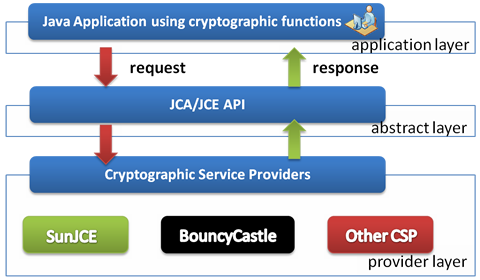
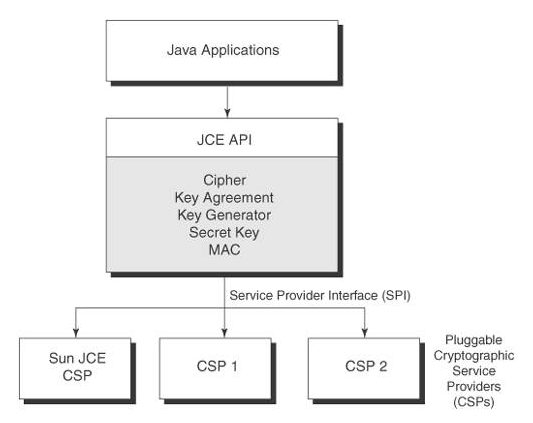
The JCE package (Java Cryptography Extension) is a library provided by Java to execute encryption algorithms in our programs.

The goal of JCE is to offer an abstraction layer integrating different cryptographic algorithms, keeping code consistent and dependent on only a few parameters to call methods regardless of the chosen algorithm.

It is also designed to be extensible to incorporate future algorithms while maintaining backward compatibility. Note that JCE does not natively contain every single algorithm in existence today.
Symmetric encryption

AES Algorithm

It uses symmetric encryption, also known as private key encryption.

Currently, several symmetric algorithms are used across software applications. We will focus on studying the AES algorithm (Advanced Encryption Standard), considered the most secure standard symmetric cipher since 2002.

Formerly called Rijndael (pronounced "Rain Doll"), created by Belgian cryptographers Joan Daemen and Vincent Rijmen, it won standard status after competing in a demanding NIST (National Institute of Standards and Technology) international contest in 1997.

Their proposal introduced a family of ciphers with varying key and block sizes.
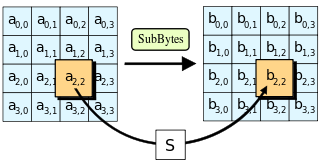
For AES, NIST selected three members of the Rijndael family, each with a 128-bit block size, but three key sizes: 128, 192, and 256 bits.

AES is based on a design principle known as a substitution-permutation network, combining both concepts.

Unlike its predecessor DES, AES does not use a Feistel network (a block cipher structure identical for encryption and decryption), but implements a variant of Rijndael working with multiples of 32 bits (min 128, max 256).

AES operates on 4x4 byte columns representing state.

The key used determines the number of round repetitions used to convert input ("plaintext") into final output ("ciphertext").

The number of repetition cycles is as follows:

  • 10 cycles for 128-bit keys.
  • 12 cycles for 192-bit keys.
  • 14 cycles for 256-bit keys.

Each round consists of processing steps composed of multiple parts, including one directly dependent on the encryption key itself.

Naturally, transforming ciphertext back to original plaintext uses the same encryption key while applying a reversed set of rounds.

  1. KeyExpansion: round keys are derived using Rijndael's key schedule.
  1. InitialRound:
  1. AddRoundKey - Each state byte is combined with a key block using bitwise XOR.

Rounds:

  1. SubBytes - Non-linear substitution step where each byte is replaced with another according to a lookup table.
  1. ShiftRows - Transposition step where state rows are cyclically shifted a set number of times.
  1. MixColumns - Mixing operation operating on state columns, combining four bytes per column via linear transformation.
  1. AddRoundKey - Each state byte is combined with the round key derived from the main key using key iteration.

Final step:

  1. SubBytes - Non-linear substitution step where each byte is replaced with another according to a lookup table.
  1. ShiftRows - Transposition step where state rows are cyclically shifted a set number of times.
  1. AddRoundKey - Each state byte is combined with the round key derived from the key iteration.

Security

The design and strength of all key lengths in AES (128, 192, and 256) have been declared sufficient to protect classified information up to "SECRET" level.

"TOP SECRET" information requires minimum key lengths of 192 or 256 bits. AES implementation in products aims to protect national security systems and/or information subject to NSA review and certification prior to acquisition and use. AES runs 10 rounds for 128-bit keys, 12 rounds for 192-bit keys, and 14 rounds for 256-bit keys.

The best attacks against this cipher reach roughly 7 rounds for 128-bit, 8 rounds for 192-bit, and 9 rounds for 256-bit keys.

Other symmetric algorithms still in use include the former standard: DES (Data Encryption Standard) or TripleDES.

Since code adjustments required to swap algorithms using JCE are minimal, focusing on one helps us understand how the rest operate.

Let's look at code samples to see how to work with this...

Before running an encryption algorithm, one essential prerequisite must be solved: deciding on the key protecting the information.

Therefore, this is the first step. Anyone with access to this key will be capable of generating encrypted data and decrypting it later.

PRIVATE KEY ALGORITHMS

PUBLIC KEY ALGORITHMS

  • DES
  • 3DES
  • RC4
  • IDEA
  • AES
  • DH
  • ElGamal
  • RSA